
Table of Contents
How To Install TexLive
There is also a tutorial on the Gregorio website for how to install TexLive.
Windows
You can either download the entire installation as an ISO file, or you can download the installer which downloads everything when you run it.
The download is very large - 2.15GB, so if you download the ISO file, set your downloader to run all night (possibly 4 or 5 hours depending on your bandwidth) before you go to bed. The installation can take about 30 to 45 minutes, depending on your computer's guts.
- There are two methods for installation: basic and advanced. Choose Advanced by running the batch file: <html>install-tl-advanced.bat</html>
- Advanced mode will give you a little GUI with some options.
- You can pretty much use the default configuration, but you might like to make the following modifications:
- Change the default paper size to letter, if you are in the United States
- Install texlive for all users
- Change the installation path from <html>C:\texlive\2012</html> to just <html>C:\texlive</html> (for the sake of simplicity)
- Change the languages that are installed for support and documentation - you probably don't need all of those, so it will save you some disk space, but don't forget to check <html>LATIN</html>
 :
:
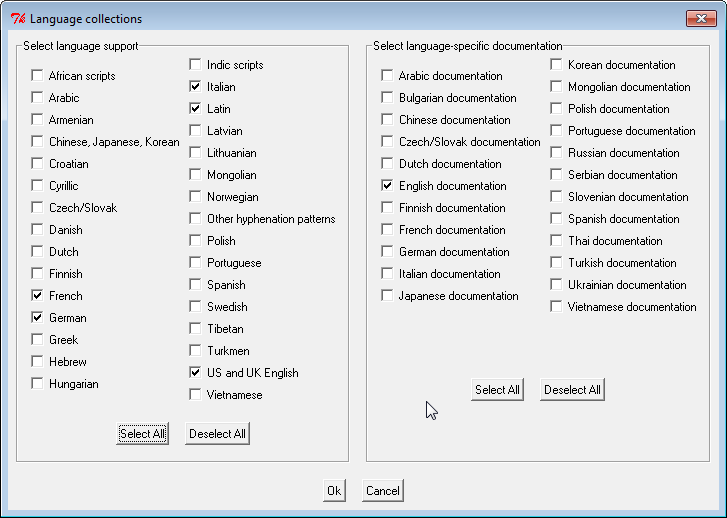
After you edit the language options, the scheme will automatically change from “full” to “custom”. - If you want to save some disk space (if you chose, you can change the “selected scheme” options to just “medium”, but you will also have to modify the “standard collections” option, by checking at least the following boxes (you can choose any and all of the other ones if you like!):
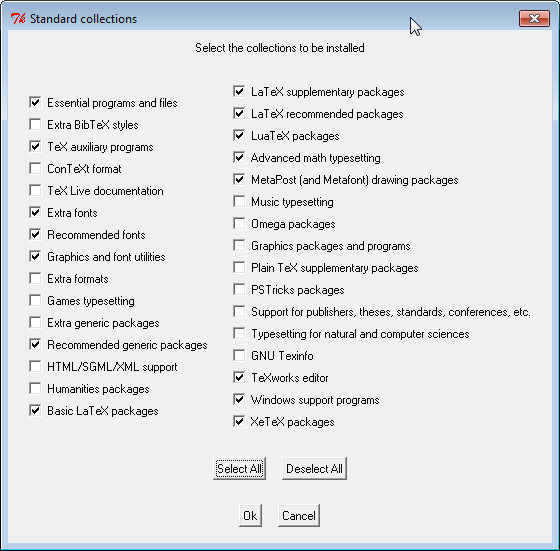
- Once you've set all of your options, push the “Install Texlive” button at the bottom of the panel.
- That's it!
- If you need to modify the installation or manage texlive settings after your installation, in your start menu you can choose “Tex Live Manager”, which will allow you to do a number of things, such as rebuild font databases and install missing or new texlive packages.
- Another handy tool that comes with TexLive is the TeXworks editor, which is also available now, from your start menu.


If you are going to install Gregorio next, be sure to RESTART your computer so that your computer will recognize any envrionmental PATH variables that were added by the TexLive installer. If you don't restart first, then, when you install Gregorio, you will get this error:

Advanced Installation Options (Customized)
Here are a recommended set of advanced installation options. Our customized options are here marked in the yellow circles.

When the installer is finished, you will see this window:

The Texlive Manager Interface:
You can use this application to modify your TexLive installation after you finished installing it.

Linux
